
Getting ready for agent authorization
Your OEP 2027 checklist
Agent authorization is one of the biggest changes coming to OEP 2027. The good news: there are several things you can do now to get your book ready and make enrollment season easier for you and your clients.
Use this checklist to prepare your book, clients, and workflow before authorization tools become available.
1. Know what’s changing
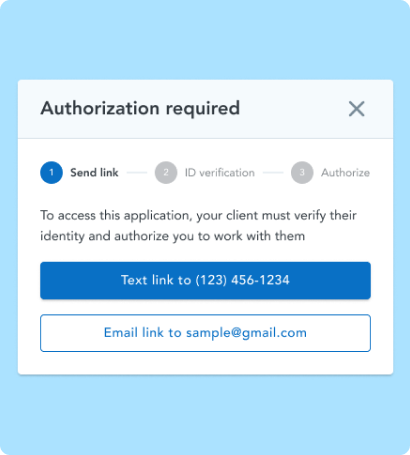
Starting with OEP 2027, you'll need authorization from each consumer before you can access or make changes to their Marketplace application. Some, but not all, consumers will also need to complete identity verification.
The requirements apply across all EDE platforms, but authorization doesn’t transfer between EDE platforms, so the tools and workflow you choose will matter: If you move a consumer to another EDE platform, you'll need to obtain authorization again and follow that platform's authorization and identity-verification process.
Read more about agent authorization, how agent authorization, consent, and CMS' Invalid Action error differ, and other frequently asked questions.
2. Make HealthSherpa your home base for PY27
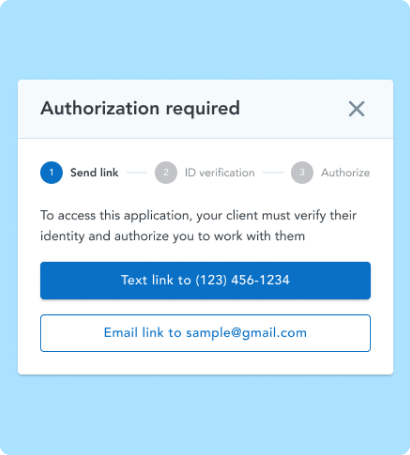
HealthSherpa tools will make the new authorization process as simple as possible for you and your clients. Our agent authorization solution is ready to release once CMS approval is complete.
Once available, HealthSherpa will make it easy to:
-
Request authorization. For example, by sending an email or text directly from HealthSherpa
-
Collect authorization and complete identity verification (when required) through a streamlined consumer experience
-
Track authorization status across your book so you know who is ready and who needs follow-up
If you move a consumer to a different EDE platform, you will need to request authorization again, and the consumer will need to complete that platform’s authorization and identity verification process using new and different workflows.
Manage your PY27 enrollments and renewals in HealthSherpa so you can use one, streamlined workflow for your entire book. Start using HealthSherpa’s authorization tools when they launch, and take advantage of dedicated training webinars to ensure success.
3. Clean up your book
Archive clients and leads who are no longer part of your active book, including people who:
-
Moved to a state where you're not licensed
-
Switched to employer or other coverage
-
Are no longer shopping for Marketplace coverage
-
Are working with another agent
A clean book means fewer unnecessary authorization requests and a more manageable OEP workload.

Tip for agency administrators: If your agency has a large book, make this a team project. Have agents clean up their own books now rather than waiting until OEP
4. Verify your clients' contact information
This is one of the most important things you can do before authorization tools launch.
Authorization requests will automatically route to the contact information on the consumer's Marketplace application. If the email address or phone number is outdated, your client may never receive the request.
Before October 12:
-
Review contact information for your active clients
-
With consent, update outdated phone numbers and email addresses by editing the plan year 2026 application.
-
Set expectations with the consumer that submitting changes could result in updated subsidy eligibility results.
-
After updates are complete, resubmit the application so the new information saves.
If a consumer's contact info on file is outdated or invalid after this change goes live:
-
Consumers will need to submit their own enrollment using a consumer-driven pathway such as using an agent's marketing link, or calling the Marketplace directly at 1-800-318-2596.
Confirm contact information if you haven't already. A quick “Is this still the best phone number and email for you?” can prevent a much bigger problem during OEP.
Tip for agency administrators: Consider making contact-information cleanup a required pre-OEP task for every agent on your team
5. Start using the Consent Library
Don't wait for agent authorization to start organizing your consent documentation.
Use HealthSherpa's Consent Library to capture and organize consent today. You can:
-
Email or text clients to capture consumer consent
-
Upload consent documents you already have
-
Keep consent records organized in one place
Review CMS's consent guidance so you understand when consent is required.
Why start now? Getting consumer consent established before OEP means one less step when enrollment volume increases. Learn more about HealthSherpa consent tools.

Important: Agent authorization and CMS consent requirements are not the same thing. Authorization does not replace the need to obtain and maintain required consent documentation.
6. Send intake forms before OE
Use HealthSherpa's intake form to collect information from consumers before you're under the OEP deadline crunch.
Send intake forms to your book now so consumers can:
-
Provide household information
-
Detail income information
-
Upload relevant documentation
-
Provide any additional information you’ll need when preparing for their renewal
Send to individual clients and leads or use bulk send to reach multiple clients at once. Learn more about HealthSherpa intake tools.

Pay attention to failed sends. A failed intake form may indicate that the contact information on a client’s application is outdated. Follow up with clients whose forms couldn't be delivered.
Outdated contact information could prevent future authorization requests from reaching the client.
Action plan for agents
☐ Clean up your HealthSherpa book
Archive clients and leads who are no longer active.
☐ Verify client contact information
Make sure your active clients' email addresses and phone numbers are current.
☐ Get your consent workflow in place
Start using the Consent Library and make sure you understand CMS consent requirements.
☐ Send intake forms early
Get household, income, and documentation updates before OEP.
☐ Review your renewals
Use Renewal factors to identify which clients need your attention first.
Action plan for agency leaders
☐ Make book cleanup a team priority
Set a deadline for agents to archive inactive clients.
☐ Have every agent verify client contact information
This is especially important for large books.
☐ Standardize your consent and intake workflows
Make sure agents know which HealthSherpa tools to use before OEP.
☐ Encourage agents to stay on HealthSherpa for PY27
Switching EDE platforms means going through the authorization process again.
☐ Direct agents to HealthSherpa for PY27 guidance
Use the Agent Hub, training, webinars, and Agent Support to keep your team up to date as CMS requirements and HealthSherpa tools roll out.

Write as yourself and remind them who you are.
Consumers respond better to a message that sounds like it's from their agent, not an automated notice.
"Hi, This is [your name], and I helped you with your current insurance coverage."
Explain what you're asking for in plain terms.
Be direct in what you are asking them to do, tell them how it will help them, and avoid jargon or phrases they may not be familiar with.
"Please complete this form so I can make sure your information is up to date and you receive the savings you qualify for."
Tell them where they're going.
If a link takes them somewhere else, say so.
"You'll be taken to HealthSherpa, the platform I use to manage your health insurance application, to complete this request."
Give them a way to double-check it's really you.
This reassures cautious clients and cuts down on "is this a scam?" hesitation.
"Want to ask about this request first? Call my office at [phone number]."
Learn more about agent authorization, other new policy updates for plan year 2027, and how to prepare for a successful OEP!
In the meantime, watch the latest agent training webinar on policy and process updates:
Check back often for the latest information and resources from HealthSherpa. We work hard to ensure HealthSherpa for Agents is optimized for real agents helping connect consumers to quality, affordable health plans.
Not on HealthSherpa? Create a free agent account or request a demo for your agency!
.png "Health Sherpa 05722 1 (2)")